If your ice machine is not making ice, the simplest solution to avoid downtime for your business seems to be calling for service. However, a service call isn’t free, and it may take some time for a technician to arrive. The problem is often not as serious as it seems at first glance and can be resolved in a couple of minutes with just a few steps. By following our checklist from the experts of HVAC systems, you’ll be able to not only identify the problem but also solve it faster than waiting for a repairman to arrive.
If the problem cannot be solved, you will still have all the necessary details for the service call to speed up the process. Go through all the steps on the checklist and find out everything about the problem right now.
Why is My Commercial Ice Machine not Making Ice? Checklist for Identifying the Causes
Before warning about a possible breakdown of the ice machine just because it isn’t making ice, you should first check whether it’s something serious. As with any device, the cause of the malfunction may be minor and easily resolved. Therefore, before calling for service, check the possible causes of the non-production of ice using the checklist provided by HVAC Systems specialists. Based on our experience, we have compiled a list of the most common problems that can be resolved without service, saving you the cost of a service call.
Quick Plan if Your Commercial Ice Machine Isn’t Making Ice
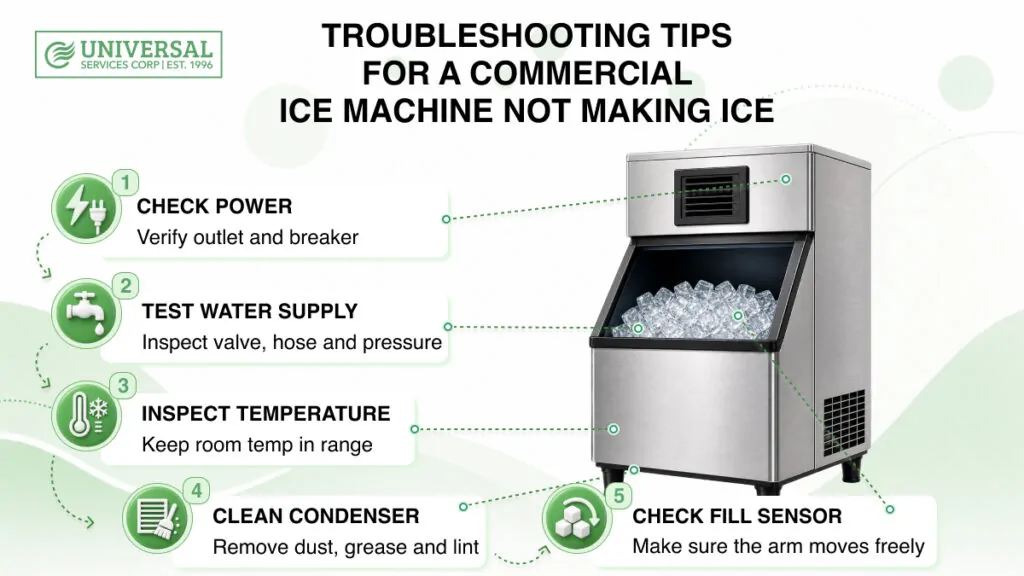
To avoid wasting valuable minutes of ice machine downtime, you need a clear plan for inspecting and resolving the issue. Follow these troubleshooting steps to resolve a minor issue or identify a serious problem:
1. External checks: power supply, water supply, ambient temperature.
2. System check: sensors, system freezes.
3. System restart: turn off, wait a moment, then turn the power back on.
4. Call a specialist: once you’ve checked everything you can.
Below is a detailed breakdown of each step so you can do everything correctly and avoid unnecessary actions.
Check the Ice Machine’s Connection to the Power Supply.
This is the first thing to check when troubleshooting electrical appliances. Although it may seem obvious, it often solves the problem.
1. Inspect the power cord to ensure it is not cut or damaged and is securely plugged into the outlet.
2. Next, inspect the commercial ice machine itself and check whether the power switch is turned on. The power indicator light on the appliance should be lit; if it is not, there is a problem with the electrical circuit.
3. More significantly, the issue may be a tripped circuit breaker. When the power supply is overloaded, the circuit breaker trips to cut off the power and prevent damage. Locate the circuit breaker panel in your building. Locate the breaker handle that has flipped to the middle position or the “Off” position. To reset it, firmly push the breaker to the “Off” position, then flip it back to the “On” position.
If none of this solved the problem, the issue isn’t with the power supply, and we can move on.
Checking the Water Supply to Your Ice Machine.
Electricity is the ice machine’s primary requirement; the second is a water supply. To check if the water supply is working properly, follow these 3 steps:
- Try turning on the water tap to check if there is currently a water supply to your establishment.
- Check the entire length of the ice machine’s hose; it should not be leaking, kinked, or twisted anywhere.
- Check the shut-off valve that controls the water supply to the ice machine; it may have been accidentally bumped or closed during cleaning. The valve handle should be aligned with the pipe; if it is perpendicular, the water supply is shut off.
- If the valve is already open, another potential issue with the water supply could be low water pressure. A sign of this is poorly formed ice cubes, which result from the trays not filling properly. The water pressure from the faucet may simply be low, or it could be due to a kinked hose. Poorly formed cubes aren’t the only issue caused by water system neglect; if you notice your ice tastes bad, it’s a clear sign your commercial ice machine needs cleaning immediately.
Ice Machine Running but Not Making Ice Due to Too High/Low Room Temperature
The next most important factor after electricity and water supply is the room temperature. Like most cooling devices, an ice machine extracts heat from the water and releases it into the air outside the system. If the temperature is too high, excess heat will have difficulty dissipating, which is a common reason why an ice machine is running but not making ice. Temperatures that are too cold accelerate ice formation and disrupt the ice machine’s processes, causing blockages and breakdowns.
1. Maintain an optimal temperature around the ice machine; check it with a thermometer to ensure the temperature isn’t too high. The optimal temperature range for an ice machine is between 59 °F and 77 °F (+15°C and +25°C). However, professional commercial ice machines are more resistant to temperature fluctuations, with a range of 50 °F and 100 °F (+10°C to +38°C). Even a slight deviation from the optimal temperature can reduce ice production by 20-40%, lengthen the freezing cycle, and increase electricity bills. Also, this speeds up the wear and tear on parts.
2. When maintaining your ice machine, it is also important to clean the condenser (the metal fin grille behind the vented panel). If the condenser is not cleaned, it becomes clogged with dust, grease, and lint. This buildup causes the system to overheat and shut down for safety reasons. Even worse, overheating can cause malfunctions and freezing. To easily clean the condenser, follow these steps:
- Turn off the power.
- Remove the ventilation panel using a screwdriver.
- Gently clean it using a stiff-bristled brush (not a wire brush).
- Use a vacuum cleaner with a brush attachment to suck up all the loosened dirt.
3. Ensure there is clear space around the ice machine’s ventilation panels. For proper airflow, we recommend leaving at least 6 inches of clearance without placing anything directly against the panels.
Commercial Ice Machine Troubleshooting: Deblocking the Fill Sensor.
Ice production may have stopped due to a fill sensor malfunction. In modern ice machine models, the machine’s ice fill level is detected by a shut-off arm or electronic sensor. The arm may get stuck in the up position, and the sensor may lock, stopping ice production even if the bin is nearly empty. Take the following steps to ensure the sensor is working properly:
1. Use the special spoon you use to scoop ice to level out the ice in the container. This is necessary because fresh ice cubes can clump together at the exit point, prematurely triggering the sensor.
2. Carefully check that the shut-off arm moves freely and is not frozen, which would block production.
Troubleshooting Freezing and Harvesting Cycle Freezes
The ice maker has two main functions: producing ice and facilitating its harvesting. Each function has its own cycle. The ice maker may get stuck in one of these cycles and halt the entire production process.
1. During the freezing cycle, water flows over a metal grid (evaporator plate), and the compressor begins to hum. If you hear the ice machine humming and water moving but no ice is forming, the issue is with the initial cycle.
2. The second cycle, the harvesting, briefly heats the metal plate to release the cubes slowly and allow them to fall into the container. If you see a full sheet of perfectly formed ice, but it’s stuck to the grid and won’t fall, the problem is in the second cycle.
3. Simply turning the machine off and then back on will help resolve the glitch and get the machine’s computer out of the cycle. If this doesn’t solve the problem, but you know which cycle is causing the issue, you’ll have useful information for your service call.
Safe Restarting a Commercial Ice Machine
An ice machine has its own internal control board, which can get stuck, much like a regular computer that has frozen up. Just like with a computer, a hard reset can fix a one-time glitch. To safely restart a commercial ice machine and ensure a clean, glitch-free start, follow these 4 simple steps:
1. Hold down the “Power Off” button until the machine shuts down completely.
2. Unplug the ice machine from the outlet.
3. Wait at least five minutes for all capacitors to discharge.
4. Plug the unit back in and press the “On” button.
A successful reset will be indicated by the startup sequence beginning with the fan and then the water pump. If it remains silent after startup, stops at the same point, or makes abnormal noises, the problem is more serious. If you’re not sure whether the restart helped, please wait at least 30-45 minutes to check if the unit completes the cycle and releases the ice.
Signs That You Need to Call a Professional Technician If Your Commercial Ice Machine Isn’t Working
There are signs that immediately indicate you can’t troubleshoot a commercial ice machine on your own without professional help. Learn these signs below so you don’t waste time on your own diagnostics and know exactly what to say when making a service call. Signs that you should call a specialist immediately include:
- Loud grinding, squeaking, or knocking noises: signs of malfunctioning critical mechanical parts.
- Water leaking not from the drain pipe but from inside the ice machine: a sign of a crack in the pump/damage to the internal hose/a faulty seal.
- Lack of cooling of components with the fan running: a sign of problems with the sealed system.
- A burning smell coming from the ice machine: you must immediately unplug the machine from the outlet.
Preventing Ice Machine Breakdowns
Once you’ve resolved the issue of a commercial ice machine not dropping ice, whether on your own or with the help of certified specialists, the last thing you want is for the problem to recur or for an even bigger one to arise. To avoid the slightest issues with your commercial ice machine and downtime during shifts, perform a monthly check that will take you just 15 minutes. A monthly inspection and cleaning of your commercial ice machine will help you prevent malfunctions and extend the life of your machine.
Call Universal Services Corp. Experts to Fix the Ice Machine That Isn’t Making Ice
Once you’ve identified the problem or noticed a telltale sign of a major breakdown, but realize you’re unlikely to fix it on your own, don’t try. Don’t attempt to solve the problem yourself, using artificial intelligence, or third-party advice, as this can significantly increase repair costs and downtime.
Don’t hesitate — call the experts right now. Contact Universal Services Corp., your local HVAC and refrigeration specialists in New York, with over 30 years of experience. We offer:
- Emergency service within an hour to minimize business downtime.
- Certified and licensed technicians trained on the main models of ice machines.
- 24/7 problem-solving, even on weekends.
The same applies to cleaning commercial ice machines. You can perform high-quality regular cleaning, but it’s best to entrust deep cleaning every six months to professionals to avoid voiding the manufacturer’s warranty and causing damage. Call Universal Services Corp. for both repairs and cleaning. We offer regular cleaning contracts to maximize the service life of your commercial ice machine and avoid fines for unsanitary conditions. Complete professional cleaning for just $650!
Conclusion
If your ice maker has stopped producing ice, first check for signs of a major breakdown. If you hear loud cracking or squeaking noises, if water is leaking from the system, if the machine isn’t cooling, or worst of all, if you smell something burning, call a repair technician immediately. If there are no visible signs of damage, check the power and water supply, check the ambient temperature, check the fill sensors, and restart the system.
If none of this helps, don’t hesitate to call a technician to avoid further downtime. Universal Services Corp. offers immediate ice machine repair services, valuing our customers and understanding how important it is to repair your ice machine as quickly as possible.